
Printing for Staff
Printing, scanning, and copying, is available - self-service - for staff throughout the university.
QMUL IT Services have provided multifunction devices to allow staff to print, scan or copy documents. The printing service works on a “Follow-You Printing” basis - where you send print to the print service and collect it at any IT Services labelled printer. You go to printer of your choice, swipe your QMUL ID card at the terminal, and release the jobs you’d like to print from your personal queue.
IT Services only supports 'fleet' printers which can be found around the campus and which can be printed to from your managed device on the QM network.
We do not support individual printers. If you feel the work/research you do requires a personal printer please talk to your Department's Operations Manager, or ITS Research.
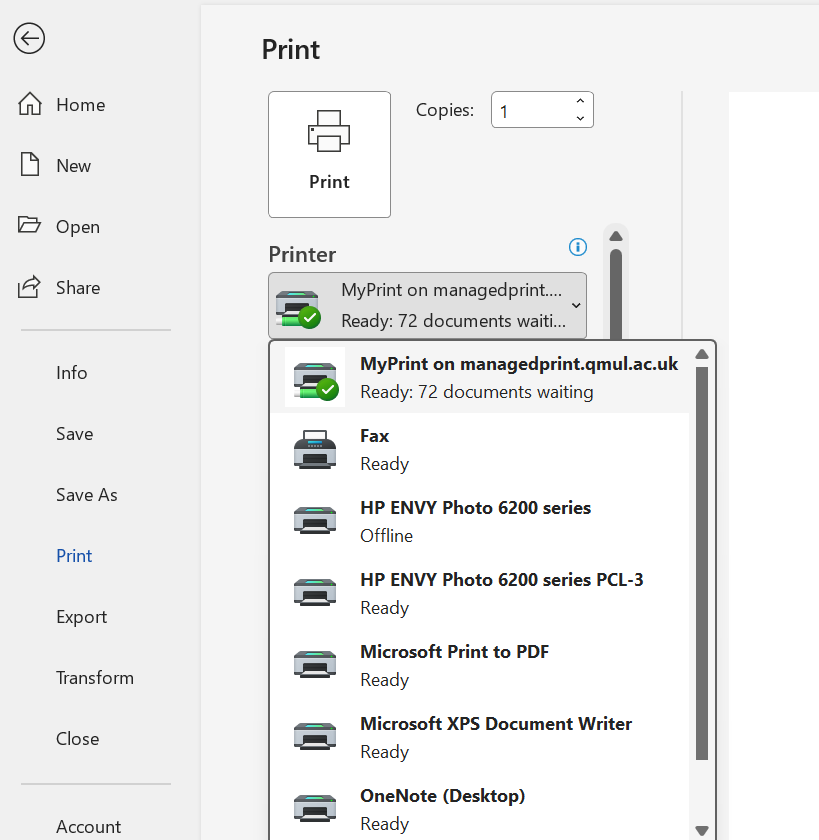 When printing a document from a QM managed computer on campus, please select MyPrint on managedprint.qmul.ac.uk queue from the printer drop down menu. This should be set to default on all campus computers.
If MyPrint does not appear automatically in the list of printers, please contact the IT Service Desk.
Copyright rules
Information on copyright rules/laws can be found here:
Green Mary
QMUL currently uses HP managed printers. This is to ensure cost and energy efficiency and to reduce the impact on the environment as much as possible.
The greenest way is to not print - please think before you print.
Our paper is Rey Copy Paper – Produced from sustainably managed forests in France and certified by the FSC (Forest Stewardship Council) and EU Eco label certified.
- 10,124.3kg CO² has been saved, from avoided print
- 95.66 trees saved, through reduced print