
Contact IT Service Desk
Our dedicated Service Desk is here to ensure that you have a smooth and uninterrupted experience with our IT services.
ITS Service Desk can also be contact by phone on: 020 7882 8888
Our Service Desk can assist you with a wide range of support, including:
- Expert assistance
- Multi-platform support
- Timely responses
- Comprehensive Solutions
- User-focused approach
/filters:format(webp)/prod01/channel_381/it-services/media/its/images/AdobeStock_816690989_Preview.jpeg)
Escalations and Feedback
While we always strive to give the best customer service, where your ticket is not handled in the manner you expect you can use our escalations service. This process is to enable the customer to escalate any items they feel have not met the required service standards through the Incident or Request ticket process.
Escalations
How to Escalate a Ticket in ServiceNow
- Open the Self-Service Portal via the following link: https://helpdesk.qmul.ac.uk/esc
- Navigate to the "Tickets" section.
- Select the ticket you wish to escalate.
- Once the ticket is open, click on the "Actions" button.
- From the dropdown menu, select "Escalate".
If the Escalate option is not available in the Portal
- This may happen if the resolution SLA has not breached or the ticket has been closed
- Email Its-escalations@qmul.ac.uk and provide the ticket reference and the reason for the escalation
Feedback
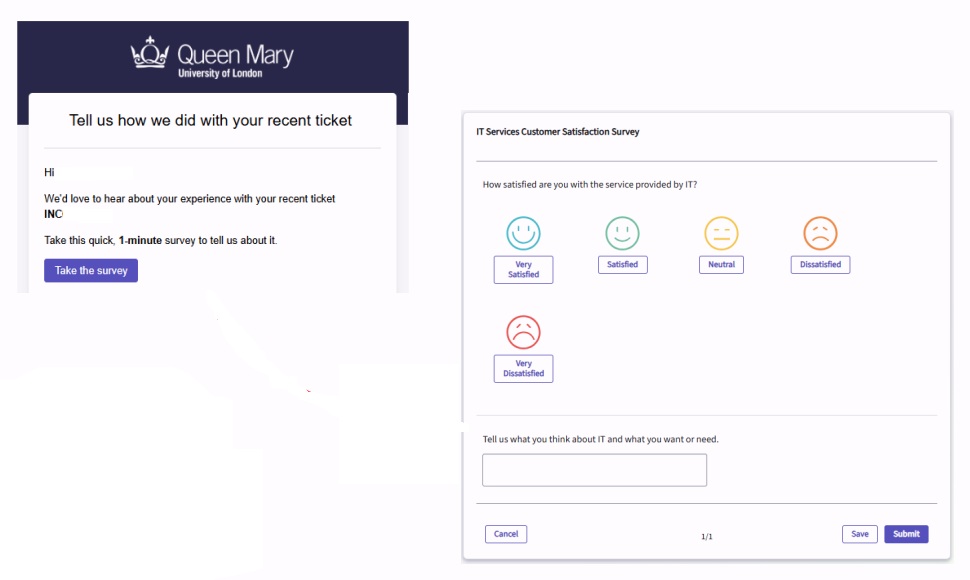
Queen Mary IT Services uses ITIL practices and methodologies. In order to ensure that we keep the high standards that you expect we also ask for your feedback.
After your request or incident has been solved you will be asked to fill out a short survey where you can rate your experience, using emojis and stake in the text box anything you would like us to know. All feedback is anonymously reviewed and used to inform services and improvements.
/filters:format(webp)/prod01/channel_381/it-services/media/its/60c9852a-e8ce-4d07-8fa0-11bb1496610b.png)
ITS Working for You
10,995tickets submitted in September 2026
ITS SMO Report
89%standard device requests provisioned within 5 working days in September 2026
ITS SMO Report
95%of teaching incidents were attended within 12 minutes in September 2026
ITS SMO Report
Acceptable Use:
Please refer to our Acceptable Use Policy for ITS Staff:
IS01 Information Security & Acceptable Use Policy.pdf [PDF 236KB]
Please refer to our Acceptable Use Policy for Students:
IS11 Student Information Security & Acceptable Use Policy.pdf [PDF 211KB]
Service Desk - Usage Guide
Follow up:
Analysts will contact customers who have not responded for more than 48 hours noting all attempts and updates within the Service Management Toolset. This is done by phone or via email.
- If a response from the customer is received the Service Desk will either resolve the issue (if the extra information has assisted resolution) or the ticket is escalated to our 2nd/3rd line teams for further investigation which may involve extra communication with the customer.
- If there is no response from the customer, on the third attempt to obtain information, the Service Desk will resolve the issue informing the customer that attempts to contact them have been unsuccessful. The customer can re-open the ticket within 5 days to progress the issue should it still be required.
We are always seeking ways to improve. Our staff will receive appropriate training, both technical and customer-focused, where we can do more at the first point of contact.
Service Level Targets
Our Service Level Description
IT Services provides both a break/fix service referred to as incidents for example “my PC is broken”, and a request service (SR) for example “I need a PC for a new member of staff”. The matrix below relates to incidents and requests and takes into account Impact and Urgency of the incident or request to give it a relevant priority, and this is detailed below.
- Impact is driven by considering whether it:
- Affects the entire business
- Affects an entire site
- Affects whole Service/ Department
- Affects Group/ VIP
- Affects User/ Work Stream
- Urgency is divided into the following areas:
- Urgent
- High
- Medium
- Low
- Very low
Both Urgency and Impact will determine the Response Level and a priority for the ticket will be calculated automatically which again determines the response and resolution time. The impact an analyst chooses depends on the situation, the urgency will be determined with the customer and common sense needs to be applied.
Service Level Categories
Service Level Categories - Gold, Silver, Bronze
Each IT service has an appropriate level of service applied. We categorise services as Gold, Silver or Bronze.
Gold
- Any business service which is deemed critical for the University and its reputation.
- Disruption or any loss of data associated with this could cause major impact or have legal implications for the University, external customers and stakeholders.
- The application or service is used by large numbers of staff, students and/or external users.
- It is necessary for the service to operate outside of normal working hours.
Silver
- Any business service whose loss would cause significant disruption but not critically impact the University’s external customers and stakeholders.
- Disruption or loss of data associated with this service would cause significant impact to internal University users.
- The application or service is used by significant numbers of staff, students and/or some external users.
- The service is generally required outside of normal working hours
Bronze
- Any business service whose loss would cause some internal University users inconvenience but not cause immediate or significant disruption.
- The application or service is used by small numbers of external customers or stakeholders but the access is infrequent and loss of the service would not have a significant impact
- There are not likely to be significant impacts associated with the loss or unavailability of data associated with this service.
- The service may be available, but is not normally expected to be accessed outside of normal working hours
Variations
The classification of some services will vary during the year. For example, during Clearing, Telephony would be classified as Highly Critical and a Gold standard applied.
Events/periods affecting service classification and categorisation include but not limited to:
- Examination Periods including re-sits
- Enrolment
- Clearing
- Open Days
- Graduation