
MS Copilot for Staff
Use secure AI chat powered by GPT-5 at no additional cost when signed in with your school or work account, now available in Microsoft 365 apps.
Getting Started with MS Copilot
For more information please see: https://support.microsoft.com/en-us/microsoft-copilot/
Microsoft Copilot is here to give advice, inspiration, and help when you need a hand. You can start a conversation to get clear answers to tough questions, turn ideas into images, or polish your writing until it shines.
Queen Mary provides access to secure AI tools, such as Microsoft Copilot, which are designed to protect your data and comply with institutional policies.
At Queen Mary, there are typically two main versions of Copilot available. One is the built-in version, the other is Enterprise Copilot 365 which has a cost, please see AI software list.
Both Built-in Copilot Chat and Enterprise Copilot version can have 365 in the name so it can be confusing.
If you see Copilot features inside Microsoft Office apps, you likely have Enterprise Copilot.
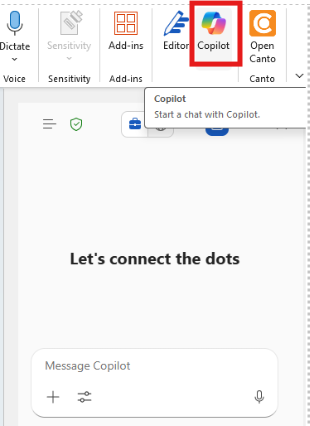
If you only have access to the web chat or do not see the “You have premium Copilot features enabled” message, you have Built in Copilot Chat (free version).
Premium Copilot can be requested via Service Desk but there is a cost for the user (paid for locally by your department or budget holder) which can be found on the AI software list.
For more information on approved tools, responsible use, and training resources, refer to the university’s AI FAQ and guidance documents.
For more information on AI tool usage as Queen Mary Staff please see the QAcademy pages:
Responsible use of AI
Responsible Use of AI
While AI offers many benefits, it’s important to use it thoughtfully:
- Check Outputs: AI can sometimes produce convincing but incorrect or biased information.
- Always review and verify results before relying on them.
- Protect Data: Never share personal, confidential, or sensitive information with AI tools unless they are approved and secure.
- Be Transparent: If you use AI to help create content, be open about it.
- Stay Informed: Use only approved AI tools for university work and follow guidance on what data can be shared.