

This year has seen some big improvements in the way we use QMplus. Across the University, digital learning teams in the three faculties have introduced a new module template which provides a clear and consistent learning journey for our students, no matter which module they are on. This includes new tabs that make it clear to students how they can access learning materials, assessment and feedback information, and support. This consistency is designed to work towards the strategic goals of Curriculum 2030 by providing better student experiences.
However, this is just a starting point. What we do with this base template will have a great impact on how students experience QMplus, but many colleagues may be unsure where to start or what support is available. In this article, we highlight some of the tools available to help develop modules and show how they can help turn the template into a purposeful learning journey, with clearer signalling, greater variety and activities designed around student needs.
Dr Maria Turri, Senior Lecturer in Creative Arts and Mental Health, was one of the first academics to use these tools to develop her module, Critical Psychiatry. Although she already had extensive experience using QMplus, the new approach enabled her to go beyond the ways she had previously used the platform and make use of a wider range of activities and features. Reflecting on her experience, Maria noted that without the templates, “it would have been a more chaotic process, it would have felt daunting” We share more of her perspectives below.
Plan before you build
Working in QMplus can be difficult and time-consuming; taking a moment to step back and plan how learning will take place over a week can make the process much easier.
In the Digital Education Studio, we often use a planning method called ABC Learning Design (Perović and Young, 2020). This uses six activity types: Acquisition, Discussion, Practice, Production, Research and Collaboration. The idea is to use these to create a learning journey for each week. There are no hard and fast rules about how many of each there should be, but each activity type supports different kinds of learning, so it is important to have a good mix.
As a planning approach, it has several advantages:
- It is grounded in Laurillard’s (2013) conversational framework.
- It helps you focus on what students will actually be doing.
- It makes the balance and variety of activities easier to see.
- It gives you a flexible plan that can change as the module develops.
Maria’s Experience
Maria found the visual planning stage particularly useful. She initially used the storyboard to work through the first few weeks, but later returned to it to map the whole module after feeling that some weeks were becoming unbalanced. As she reflected, “seeing it visually like that and seeing the difference and the alternating of the activities was very helpful.”
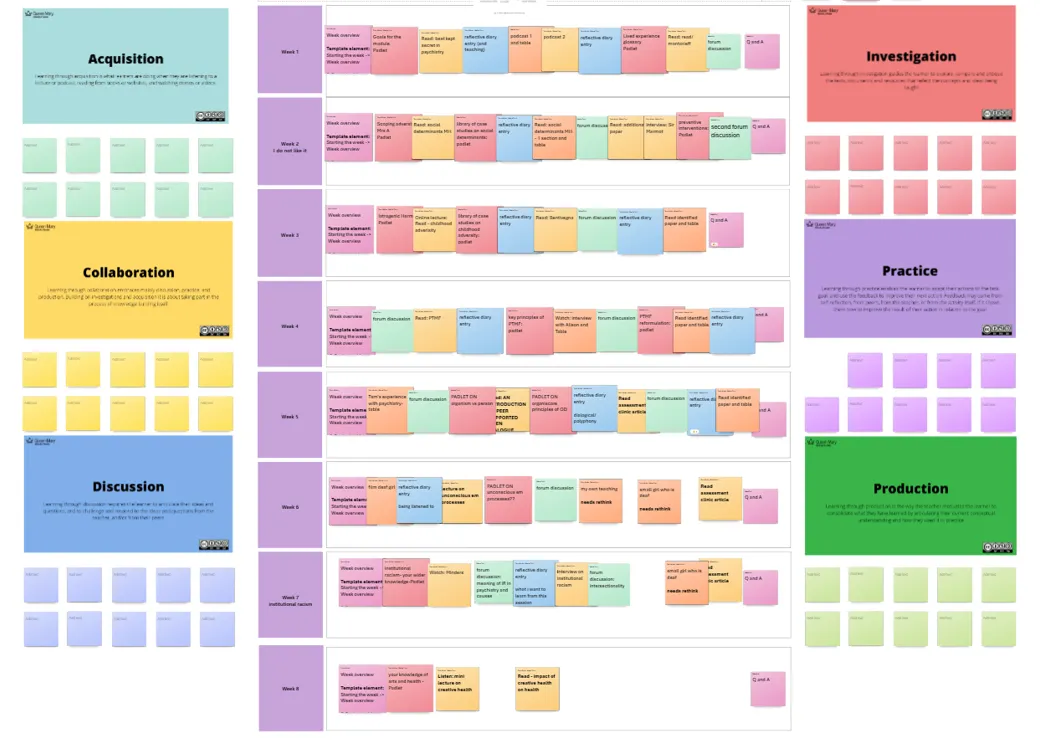
Image of Maria’s planning space showing the different activity types spread across the weeks.
The flexibility of the approach was also important for Maria. Rather than treating the storyboard as something that had to be completed perfectly at the start, she used it as a working document, moving things around as she developed the content.
Click here to access a short video showing you how to plan with this approach. (Requires QM login)
Click here to access the Microsoft Whiteboard Template. (Requires QM login)
Don’t build everything from scratch
Once you have your plan, getting it into QMplus can be daunting. The Module Library is a custom tool that allows you to add predesigned pages into your module. It includes a menu of options aligned with the ABC Learning Design activity types and is organised to help you structure your week.
There are templates to help introduce and end weeks of learning, as well as core templates for developing learning materials. If you want to add a page for hosting a video lecture, for example, it is as simple as selecting that option from the menu.
Pages in the Module Library are not just empty elements; they also include guidance on how to make the activity work well. For a video page, for example, you are prompted to contextualise the video and give students active-watching prompts so they engage more purposefully with their learning.
One benefit of this tool is that it may provide ideas and options you had not yet considered or weren’t aware were possible in QMplus.
Maria’s Experience
Maria found that the tools helped her do things she would not previously have felt confident implementing herself and expanded what she felt able to build within QMplus. She noted how she had “never embedded a discussion forum” before using the templates.
This became particularly important when developing a fully online module. Rather than relying mainly on pre-reading, further reading and the occasional recorded lecture, Maria was designing weeks with a much wider range of activities. She felt working with the templates “definitely enlarges your repertoire” of what is possible in QMplus.
Click here for a short video showing how to access the Module Library. (Requires QM login)
Bring attention to what’s important
The other tool available to help develop QMplus pages is Components for Learning.
These provide stylised elements that help you highlight important parts of a page and create clear, consistent visual cues for students.
Maria’s Experience
This was one of the tools Maria found herself using most. Before using Components for Learning, if she wanted something to stand out, she would generally “use bold”. The Components gave her more options, including highlights, further-reading boxes and light-bulb prompts, which she used both to structure the material and to give herself ideas about how content might be presented.
In the example below from Maria’s course, the orange alert box draws attention to particularly important information, while the green banner acts as a consistent cue that students are required to engage in an activity, in this case a quiz.
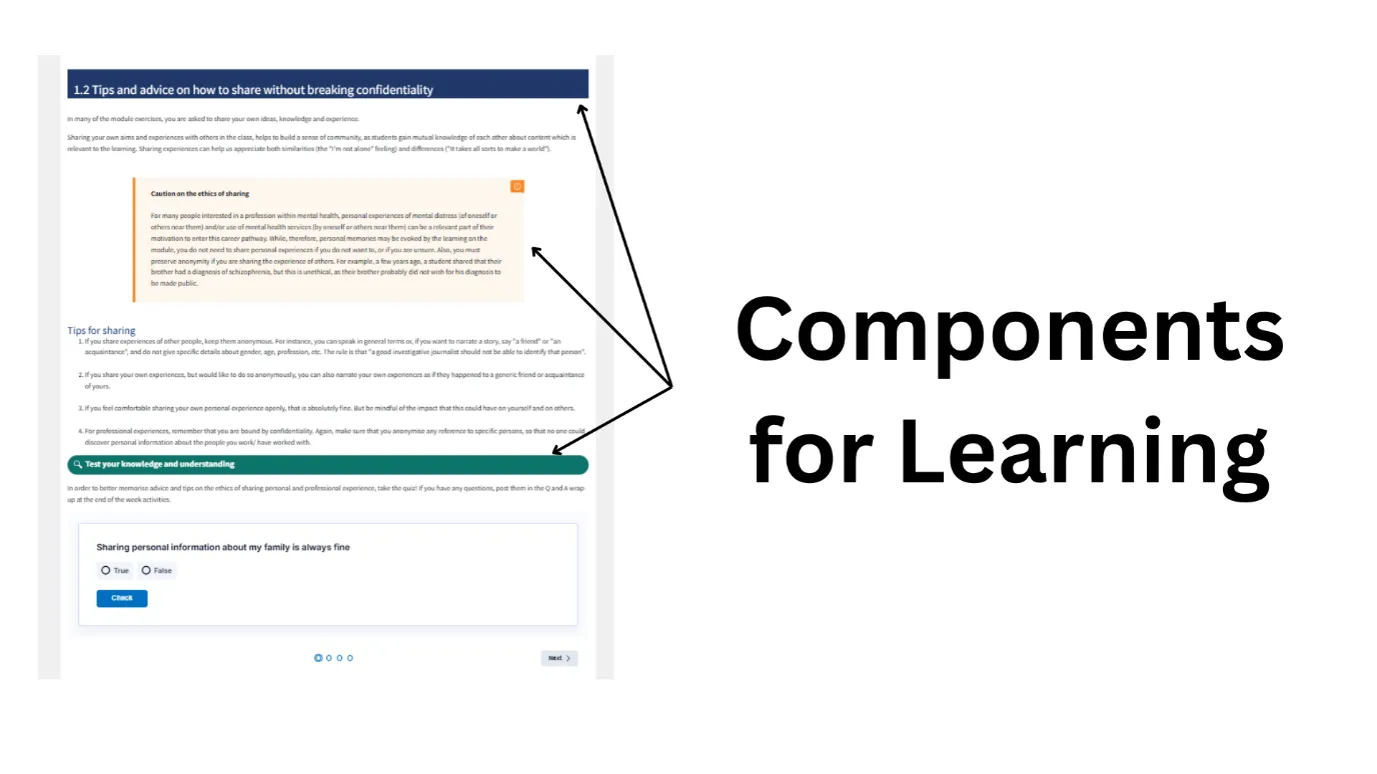
Image of one of Maria’s pages. Use of alert boxes and banners help direct the student’s attention.
Maria also found that browsing the available components helped her think differently about the structure of her teaching. She described using them to reconsider where further reading should sit, whether content should be divided differently, and to “give myself ideas as well”.
Click here for a short video showing how to use the Components for Learning plugin. (Requires QM login)
Conclusion
The module template provides a consistent starting point, but it is how we build on that foundation that shapes the student experience. Planning helps us think deliberately about what students will do and how activities fit together; the Module Library makes it easier to translate those plans into QMplus; and Components for Learning can help make the resulting journey clearer for students. These tools do not determine the learning experience themselves, but they can make it easier to design activities that are purposeful, varied and appropriate to your students, context and intended outcomes.
For those thinking about redesigning their module, Maria highlighted that seeing examples from other modules was particularly helpful. Anyone looking for inspiration can view our CARE Digital Education Course.
References
Laurillard, D. (2013) Rethinking University Teaching: A Conversational Framework for the Effective Use of Learning Technologies. 2nd edn. London: Routledge. Available at: https://doi.org/10.4324/9781315012940.
Perović, N., & Young, C. P. L. (2020). ABC LD – A new Toolkit for Rapid Learning Design. EDEN Conference Proceedings, (1), 426–437. https://doi.org/10.38069/edenconf-2020-ac0041